Salmon Data Integration System — Start Here
Canonical specification (Markdown): Salmon data package specification
This page is a high-level overview of the workflow. For complete package details and field requirements, use the canonical specification above.
DFO Pacific Science • Data Stewardship Unit
The front door for salmon data integration workflows
Use one system, one order: ontology terms, package metadata, metasalmon review, optional guided review, and package-first SPSR intake.
The system flow
2) Salmon data package
Package data and metadata in the canonical `metadata/` + `data/` layout.
Open SDP spec4) Guided review (optional)
Use SMN-GPT or another constrained assistant for ambiguity triage after the package exists.
See package-first intake guidance5) SPSR Intake
Use the package-first wizard or bulk route for CU/composite, SMU, or Population uploads.
Open SPSR upload wizardSalmon data package overview (diagram)
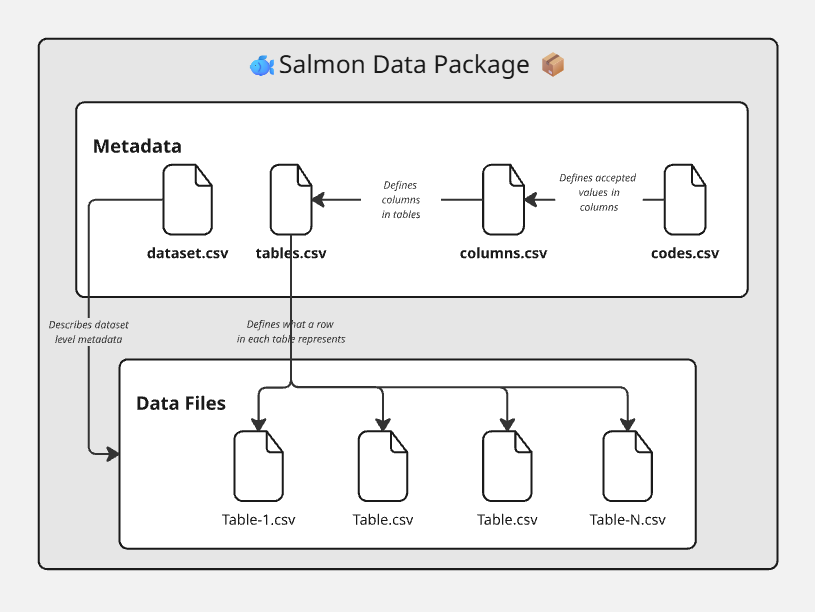
The diagram is conceptual. The current canonical layout groups metadata files under metadata/, data tables under data/, and may include an optional root datapackage.json.
What to use this page for
- new contributors who need the shortest correct path
- analysts preparing FSAR datasets for submission
- reviewers checking if a package is intake-ready